

Student support meetings go badly when the data is scattered: intervention plans in one file, session records in another, progress scores in a notebook, and review dates remembered by whoever attended the last meeting. The MTSS RTI Intervention Tracker for Excel pulls all of it into one connected workbook, so a plan, its sessions, its scores, and its next review are always one click apart. Use it to prepare for student support meetings, review scores against an entered target, and see at a glance which intervention reviews or follow-up actions need attention.
What's inside the toolkit
The toolkit combines a connected spreadsheet workbook with six printable forms, a fictional worked example, and a quick-start guide. What you receive:
- Blank Excel master workbook with 9 worksheets — Dashboard; Student Summary; Students; Interventions; Sessions; Progress; Reviews; Settings; Start Here.
- A separate Excel workbook with fictional example records — so you can see the system working before you enter a real student.
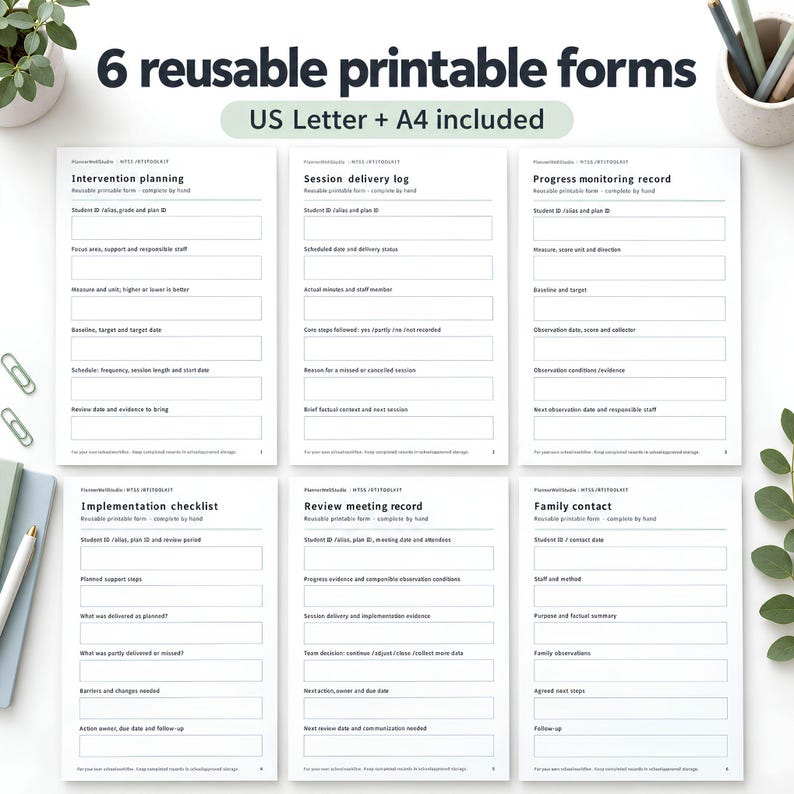
- Six printable forms in US Letter PDF, and the same six forms in A4 PDF — Intervention Planning; Session Delivery Log; Progress Monitoring Record; Implementation Checklist; Review Meeting Record; Family Communication Record. These PDFs are designed to print and complete by hand.
- A four-page buyer quick-start guide PDF.
- Capacity: up to 100 students, 200 intervention plans, 1,000 session entries, 1,000 progress entries, and 200 review records within the prepared rows; chart view shows the first 30 valid observations per plan. The workbook is undated, with editable school-year settings. Macro-free .xlsx files; Microsoft Excel is required (no Google Sheets version).
How the workbook works
Plan and record support. Create a student roster and connect each intervention to a unique student ID and Plan ID. Record the focus area, the support, the score measure, the baseline, the target, the schedule, the responsible staff member, and the review date. One student can have more than one intervention plan, and each plan stays separate.
Track sessions and scores. Record delivered, missed, and cancelled sessions, actual delivery minutes, and brief factual notes. Add progress scores in observation order. Goals can use either higher-is-better or lower-is-better scores, and a score of zero is treated as valid data — because zero is information, not a missing entry.
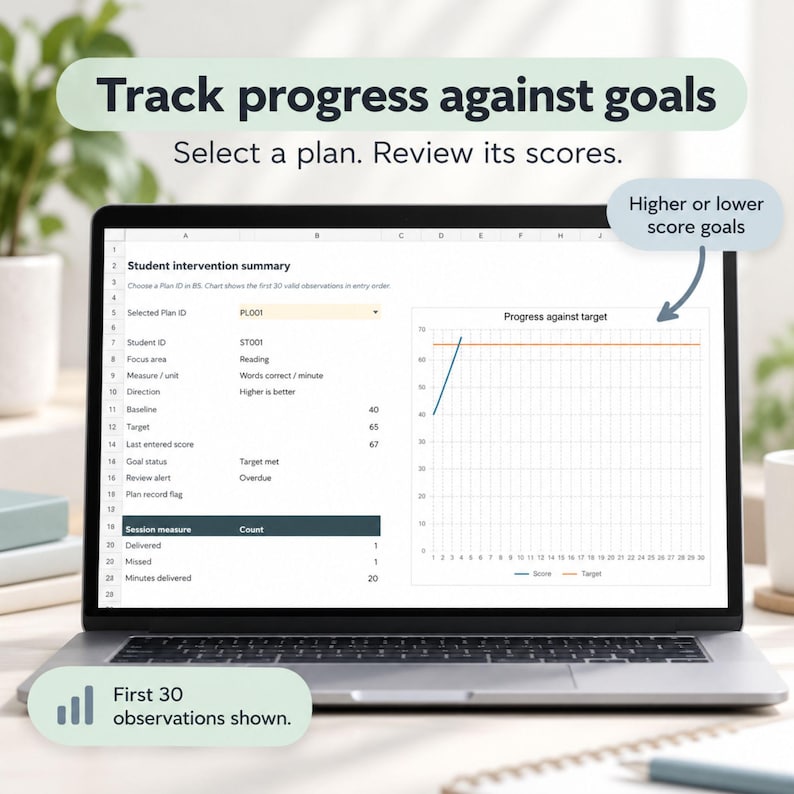
Review a plan. Select a Plan ID in Student Summary to view its target, last entered valid score, goal status, delivered minutes, and missed sessions. A line chart displays the first 30 valid observations for the selected plan against its target, so the trend is visible without building a chart yourself.
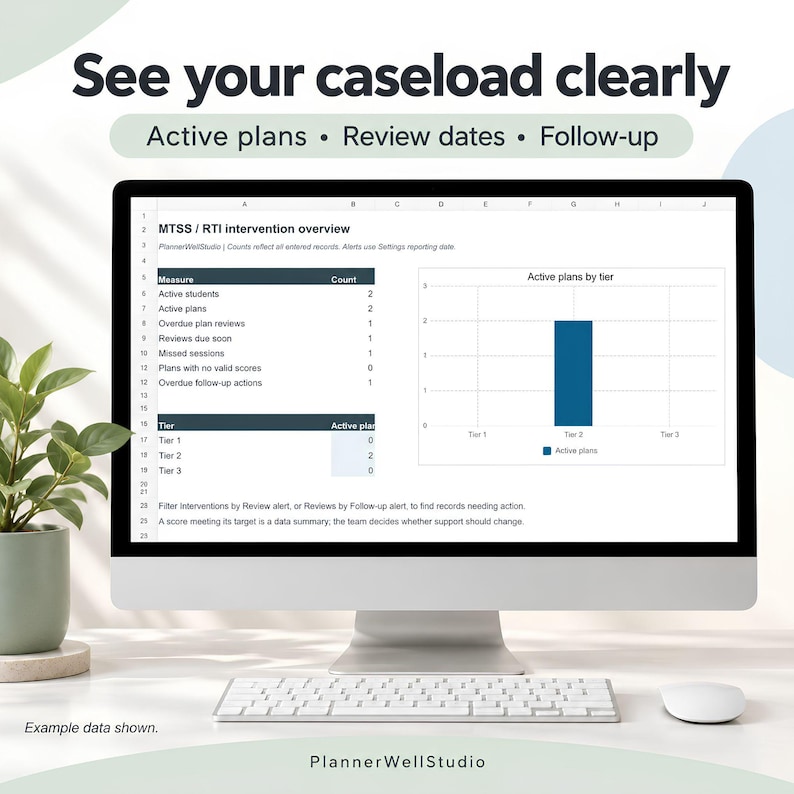
Follow up on reviews. The dashboard summarizes active students and plans, overdue reviews, upcoming reviews, missed sessions, plans without valid scores, and overdue follow-up actions. Set a reporting date and review warning window in Settings — reminders use that entered date, so update it when reviewing records.
Free sample pages
Try the layout before you buy — these sample pages from the tracker are free to view here:
Study the dashboard first: it is the page that tells you, before any meeting, which reviews are overdue, which plans have no valid scores yet, and which follow-up actions are still open. That is the page that turns a meeting from guesswork into a review.
How to use it through a term
Start on the Start Here sheet, then set your reporting date and review warning window in Settings. Enter your students, then create one intervention plan per student need, each with its own Plan ID, baseline, and target. After each session, log delivery and minutes on the Sessions sheet; after each progress check, add the score on the Progress sheet. The Student Summary and Dashboard update from what you entered — you do not rebuild them.
Before a student support meeting, open the plan's Student Summary: target, last valid score, goal status, delivered minutes, missed sessions, and the chart against target. That one view carries the meeting. After the meeting, record the review and its follow-up actions on the Reviews sheet, so the next review date is set before you leave the room. The six printable forms cover the same ground on paper for observations and meetings where a screen is not practical.
Who it is for
This tracker is for interventionists, student support teams, special education teachers, and general education teachers running MTSS or RTI plans — anyone who has to show, with dates and scores, whether an intervention is working and what happens next. If your current system is a folder of separate files, this is the single workbook that replaces it.
Get the full tracker on Etsy
The sample pages above show you the layout. The full MTSS RTI Intervention Tracker — the 9-worksheet Excel workbook, the fictional example workbook, the six printable forms in US Letter and A4, and the quick-start guide — is on Etsy at PlannerWellStudio:
Shop the MTSS RTI Intervention Tracker on Etsy — $19.55, instant digital download; visit the listing for the full tracker and what's included.



: Free Sample Pages to Try First)
0 Comments